# Stateful Styles With XState and Styled System
You've probably seen a button like this one before:
```jsx
```
One that has options:
```jsx
```
Maybe even more options:
```jsx
```
But what if I did this?
```jsx
```
That's probably not allowed. I guess we'll change the API to avoid that:
```jsx
```
This is kind of a state machine! Your `Button` can only be in one `variant` (state) at a time.
Here's what a parallel state machine (basically multiple independent state machines) would look like:
```jsx
```
I've found that these kind of style props work very well with logical state machines. Check out the following example of a... thing:
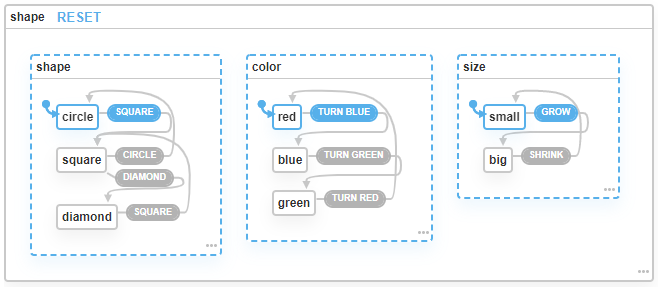
It's a parallel state machine with 3 sub machines:
- One machine that let's you change the shape:
- From Circle to Square
- From Square to Diamond
- From Square to Circle
- From Diamond to Square
- One machine that let's you change the color:
- From Red to Blue
- From Blue to Green
- From Green to Red
- One machine that let's you change the size:
- From Small to Big
- From Big to Small
If we want to craft some stateful styles for this thing, we'd need a component with an API like this:
```jsx
```
You can implement it however you like, but what I like to do is use [`styled-system`'s `variant` API](https://styled-system.com/variants), because it maps nicely to the state machines we defined:
```jsx
import styled from 'styled-components'
import { variant } from 'styled-system'
const Thing = styled(
variant({
prop: 'shape',
variants: {
square: {
/** Make it square */
},
circle: {
/** Make it circular */
},
diamond: {
/** Make it a diamond */
},
},
}),
variant({
prop: 'color',
// ...
}),
variant({
prop: 'size',
// ...
})
)
```
(You can use it with either Emotion or Styled Components)
Now to wire it up to our state machine using `xstate` and `@xstate/react`
```jsx
function App() {
const [state, send] = useMachine(shapeMachine);
return
}
```
Ta-da! A little explanation:
In case of a hierarchical or parallel state machine, ours being the latter, `state.value` contains an object representation of our current state (check [the docs](https://xstate.js.org/docs/guides/states.html) for more info). Our state could look something like this:
```json
// state.value
{
shape: "circle",
color: "red",
size: "small"
}
```
Which happens to look exactly like our component's prop interface! Of course you can also do _this_ if you want your code to be a bit more explicit and readable:
```jsx
function App() {
const [state, send] = useMachine(shapeMachine);
const { shape, size, color } = state.value
return
}
```
Here's a [CodeSandbox](https://codesandbox.io/s/stateful-cssinjs-6mpxe) with a fully working example.